
Build on the Spatial AI Stack
A foundation of spatial primitives and scalable real-time query tools, under a secured, model-agnostic agentic harness — so you can build your own agents that perceive, reason and act on your floor.
For: developers, system integrators and AI specialists who want governed location intelligence and a closed-loop write-path — without building positioning, scale or agent governance from scratch.
The stack you build on
Four layers, bottom-up. The agents are the top of a deep spatial engineering stack — not a chatbot bolted on. You connect at the layer you need: the typed SDK and REST API for direct integration, a governed MCP interface for any agent.
rtls-core
Spatial primitives — point-in-polygon, distance, radius, geometry
rtls-api
Scalable real-time query & manipulation — filter DSL, navigation, streaming
Agentic harness
Secured, model-agnostic — sessions, scoping, governed tools, audit
Your agents
Perceive • Reason • Act
Foundation: spatial primitives
rtls-core is 140+ pure functions for point-in-polygon (~4M ops/sec), distance (~6.6M ops/sec), radius and geometry — plus 6 TSP algorithms, A* with four heuristics and bidirectional search (20-30% faster), and Douglas-Peucker simplification — fusing 8 positioning technologies under one model.
Foundation: scalable query API
rtls-api exposes 130 REST endpoints across 20 modules — plus WebSocket streaming — with a 20+ operator query DSL and pathfinding, scaled across instances with Redis caching.
Secured, model-agnostic harness
Isolated per-user sessions, JWT + API-key + namespace scoping, governed tool access, human-in-the-loop and a full audit trail — running on any LLM, cloud frontier or open-weight on-prem.
Agents on top — yours or ours
Three agent-and-engine pairings run on this stack today: the Rule Agent on the NLP rule engine, the Script Agent on a safe, sandboxed real-time script engine, and the Dashboard Copilot on analytics. The same surfaces — SDK, API, governed MCP interface — let you build your own.
Built on Real Foundations — By the Numbers
Spatial AI needs a foundation that can keep up with the physical world — here is ours, in verified figures. This is the scale and surface area your agents are built on.
Three surfaces onto one governed foundation
The same foundation — spatial primitives and a scalable query API — is reachable three ways: a typed SDK for direct integration, the REST API for any stack, and a governed MCP interface for any agent. All read the same verified location, under the harness.
Spatial Foundation
rtls-core primitives + rtls-api query
Governed Interface
SDK · REST · MCP (44 tools)
Your AI Agent
Perceive • Reason • Act
Multi-technology location
Eight positioning technologies — BLE, BLE Attractor, UWB TWR, UWB TDoA, BLE Presence, Declared, AoA and GPS — fused under one consistent model in the foundation.
Typed TS/JS SDK + REST API
The ubudu-rtls-sdk ships OpenAPI-generated types, 8 resource classes and a 14+ operator filter DSL. Node 18+, ESM and CJS — or call the REST API directly from any stack.
Governed MCP interface
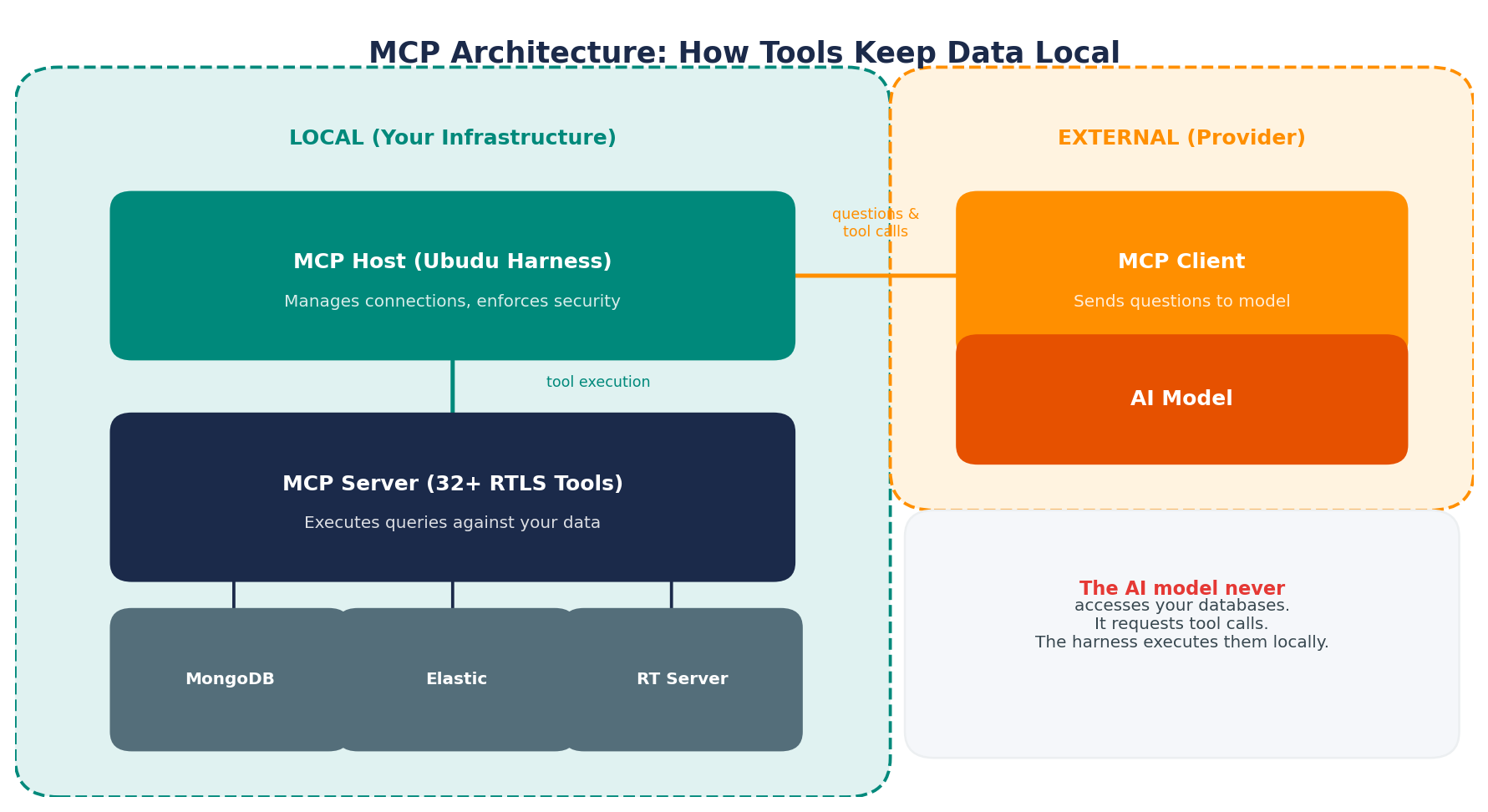
The harness reaches the foundation through a governed Model Context Protocol interface (an open standard, under the Linux Foundation): agents only see pre-defined tools; execution stays server-side.
Closed-loop write-path
Beyond reading: drive ESL e-paper labels, pick-to-light LEDs and locks from the located tag — each action acknowledged and written to an audit trail.
Start in the SDK — real code
The ubudu-rtls-sdk is TypeScript / JavaScript only (there is no Python, Java or Go SDK — for other stacks, call the REST API directly or connect through MCP). Install it, then query live location with full types.
Install
Add the package to any Node 18+ project. The MCP server runs alongside it: use the SDK for direct integration in your apps, the MCP server for AI agents.
npm install ubudu-rtls-sdkimport { createRtlsClient } from '@ubudu/rtls-sdk';
const client = createRtlsClient({
apiKey: process.env.RTLS_API_KEY,
namespace: 'my-app',
venueId: 123,
timeoutMs: 10000,
});
const assets = await client.assets.list();
const positions = await client.positions.listCached();
const zones = await client.zones.list();
// Override the default context per call
const stagingAssets = await client.assets.list({ namespace: 'staging' });import { filters, combineFilters } from '@ubudu/rtls-sdk';
const filter = combineFilters(
filters.equals('user_type', 'forklift'),
filters.contains('user_name', 'warehouse')
);
const filtered = await client.assets.list(filter);
let count = 0;
for await (const asset of client.assets.iterate()) {
console.log(asset.user_name);
if (++count >= 100) break; // stop early, save bandwidth
}{
"conditions": { "all": [
{ "fact": "battery_percent", "operator": "lessThan", "value": 20 }
]},
"event": { "type": "message", "params": {
"title": "Low Battery Alert",
"text": "Asset battery is below 20%",
"style": "warning", "duration": 10,
"coalescence": 3600, "coalescence_group": "battery_alerts"
}}
}The rule above is generated from plain language by the Rule Agent, validated and test-passed against the rule engine before you publish it.
The Governed Tool Interface — 44 Tools Across 3 Agents
This is how agents reach the foundation: a governed Model Context Protocol interface over the spatial primitives and query API. In total there are 44 governed tools across three specialized agents — the Dashboard Copilot (13 tools), the Script Agent (16 tools) and RTLS discovery (15 tools). The RTLS discovery tools below — across discovery, venue, asset, zone, navigation, real-time and spatial categories — read verified location and are available to your own agents.
Discovery
rtls_discover_system
rtls_get_data_model
rtls_get_field_info
Assets
rtls_list_assets
rtls_search_assets
rtls_get_asset
rtls_get_asset_position
rtls_get_asset_tree
Real-time
rtls_get_current_positions
rtls_get_position_history
rtls_find_nearest_assets_realtime
rtls_get_zone_presence
Zones
rtls_find_zone_at_point
rtls_find_zones_in_radius
rtls_find_nearest_zones
rtls_get_zone_history
rtls_calculate_zone_distances
Navigation
rtls_navigate_shortest
rtls_navigate_accessible
rtls_optimize_multi_stop
rtls_find_nearest_pois
rtls_find_evacuation_route
Venue
rtls_get_venue_geometries
rtls_find_pois_by_tag
rtls_find_pois_in_radius
rtls_get_poi_statistics
Spatial
rtls_analyze_custom_zones
rtls_analyze_custom_pois
rtls_find_nearest_assets
rtls_patterns
Per-property LLM-Enabled toggles control exactly which fields a model can see. Data-grounded: every value is read from live RTLS via governed MCP tools, with field-name validation against the live schema.
One tool call, in and out
MCP tools take typed inputs and return structured results an agent can reason over. Here is the shape of a single spatial-analysis call.
rtls_find_nearest_assets with a point and a radius
{
  "tool": "rtls_find_nearest_assets",
  "arguments": {
    "point": { "x": 42.5, "y": 18.0 },
    "asset_type": "wheelchair",
    "limit": 3
  }
}{
"results": [
{ "asset_id": "WC-204", "zone": "Ward B", "distance_m": 6.4 },
{ "asset_id": "WC-118", "zone": "Corridor 2", "distance_m": 11.9 },
{ "asset_id": "WC-090", "zone": "Ward C", "distance_m": 18.2 }
],
"count": 3,
"query_point": { "x": 42.5, "y": 18.0 }
}Field names and values shown for shape illustration. Spatial queries run on a core measured at 6.6M distance ops/sec and 4M point-in-polygon ops/sec.
Connect Your AI Assistant
Connect with Claude Desktop, Claude Code, Cursor, Windsurf, n8n, LangChain, LangGraph, CrewAI, AutoGen, LlamaIndex — or any MCP-compatible client. Below are setup recipes for the most common ones; the same HTTP endpoint works everywhere.
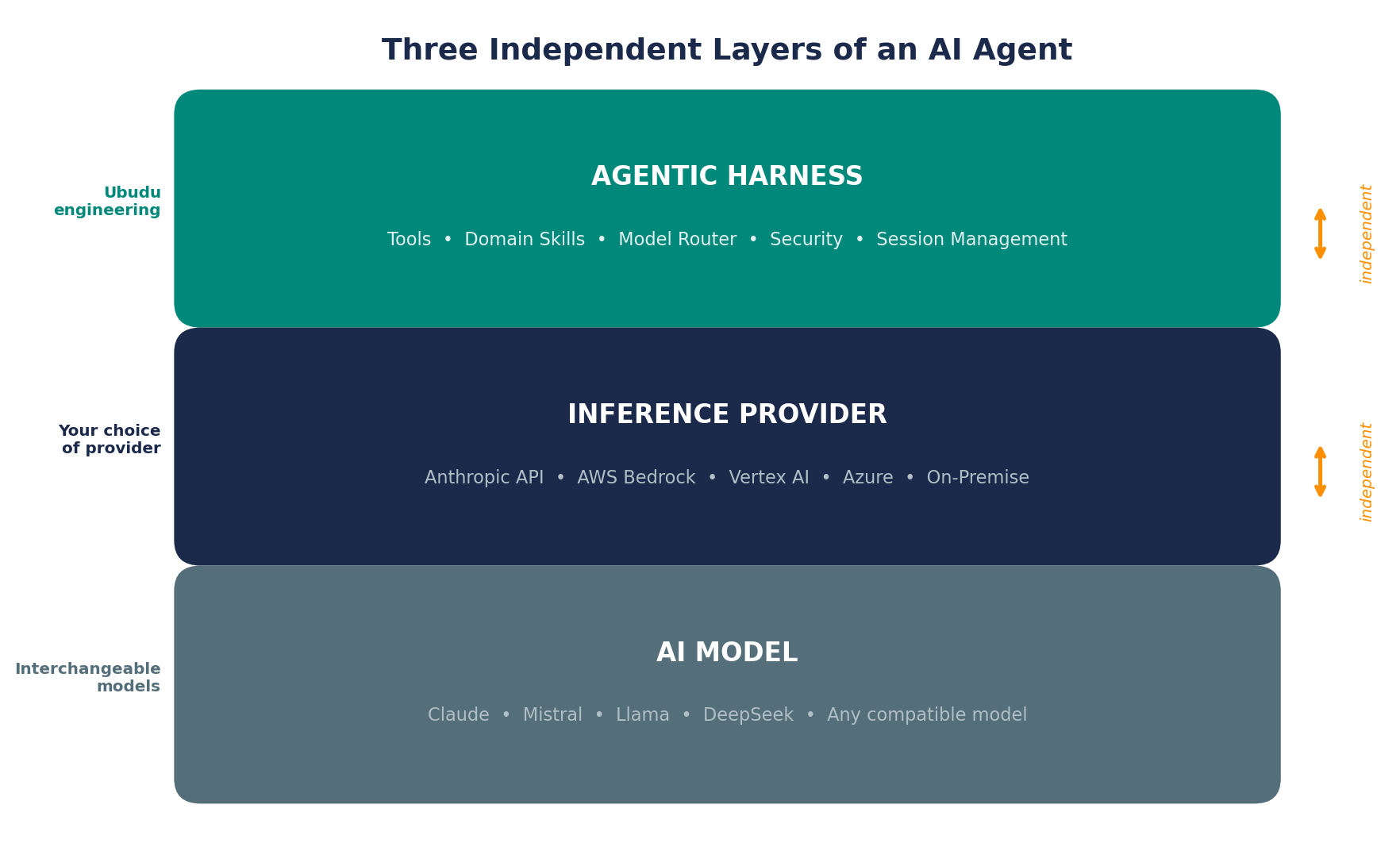
Model-agnostic by design
Point your client at a frontier cloud model — Claude, GPT-5, Gemini, or any OpenAI-compatible endpoint — or an open-weight model (Mistral, Llama, Kimi, Qwen, DeepSeek, MiniMax) running on-prem for EU data sovereignty. The harness and the 44 governed tools stay the same; the model is a configuration choice.
Claude Code (CLI)
Add the MCP server via command line (HTTP transport):
claude mcp add --transport http ubudu-rtls \
  https://mcp.ubudu.com/mcp \
  --header "X-API-Key: your-api-key" \
  --header "X-App-Namespace: your-namespace"
Claude Desktop
Claude Desktop uses stdio. Bridge to the HTTP server with mcp-remote:
{
  "mcpServers": {
    "ubudu-rtls": {
      "command": "npx",
      "args": [
        "mcp-remote",
        "https://mcp.ubudu.com/mcp",
        "--header", "X-API-Key: your-api-key",
        "--header", "X-App-Namespace: your-namespace"
      ]
    }
  }
}
Cursor
Configure in .cursor/mcp.json with a stdio proxy:
{
  "mcpServers": {
    "ubudu-rtls": {
      "command": "npx",
      "args": [
        "mcp-remote",
        "https://mcp.ubudu.com/mcp",
        "--header", "X-API-Key: ${UBUDU_API_KEY}",
        "--header", "X-App-Namespace: ${APP_NAMESPACE}"
      ]
    }
  }
}
Windsurf (Codeium)
Add to ~/.codeium/windsurf/mcp_config.json:
{
  "mcpServers": {
    "ubudu-rtls": {
      "command": "npx",
      "args": [
        "mcp-remote",
        "https://mcp.ubudu.com/mcp",
        "--header", "X-API-Key: your-api-key",
        "--header", "X-App-Namespace: your-namespace"
      ]
    }
  }
}
n8n
Connect via the MCP Client node over HTTP transport for workflow automation:
Server URL: https://mcp.ubudu.com/mcp
Headers:
  X-API-Key: your-api-key
  X-App-Namespace: your-namespace
LangChain · LangGraph · CrewAI · AutoGen · LlamaIndex
Any framework with an MCP adapter connects to the same HTTP endpoint. Example with langchain-mcp-adapters:
from langchain_mcp_adapters import MCPToolkit

toolkit = MCPToolkit(
    server_url="https://mcp.ubudu.com/mcp",
    headers={
        "X-API-Key": os.getenv("UBUDU_API_KEY"),
        "X-App-Namespace": os.getenv("APP_NAMESPACE")
    }
)

# Get the RTLS tools for your agent
tools = toolkit.get_tools()
Your First Queries in 30 Seconds
Once connected, just ask in natural language. Each answer is a tool call against verified location — not a guess.
"What's in my RTLS system?"
System profile: venues, zones, assets by category, active tag count
"Where is forklift FL-07 right now?"
Current zone, coordinates, last-seen timestamp, and a clickable map link
"Show me all assets in the Loading Bay"
Assets currently in the zone, with dwell times and entry timestamps
"What's the fastest route from Dock A to Assembly Line 3?"
Turn-by-turn indoor navigation with distance and estimated walk time
"Which zone had the most traffic yesterday?"
Zone ranking by visit count, peak hours and congestion patterns
"Find the 5 nearest wheelchairs to Room 204"
Sorted list with distances, availability status and navigation links
Pro tip: follow up naturally. The assistant keeps context — "Now show me that on a map" or "What about last week?" just works.
Getting Your Credentials
To connect to the Ubudu RTLS MCP Server, you need:
- API Key: request from your Ubudu account manager or generate it in the RTLS admin panel.
- Namespace UUID: found in your RTLS application settings (format:
xxxxxxxx-xxxx-xxxx-xxxx-xxxxxxxxxxxx). - API URL: usually
https://rtls.ubudu.com/api(or your custom / on-prem deployment URL).
See the rtls-sdk documentation for detailed setup instructions.
HTTP-Only Server
The Ubudu MCP Server uses HTTP transport exclusively for secure, multi-tenant access. Credentials are passed via request headers.
Native HTTP Support
Claude Code, n8n, LangChain and other HTTP-capable clients connect directly.
https://mcp.ubudu.com/mcp
stdio Proxy Required
Claude Desktop, Cursor and Windsurf need a stdio-to-HTTP proxy such as mcp-remote.
npx mcp-remote https://...
About the stdio Proxy
Some clients only support stdio (subprocess) connections. The mcp-remote package bridges stdio to HTTP so those tools reach our server. Install it via npm:
npm install -g mcp-remoteThe Write-Path: Act on the Floor
Most RTLS stops at the dashboard. Here, the same located tag writes back into the physical world — and every action is acknowledged.
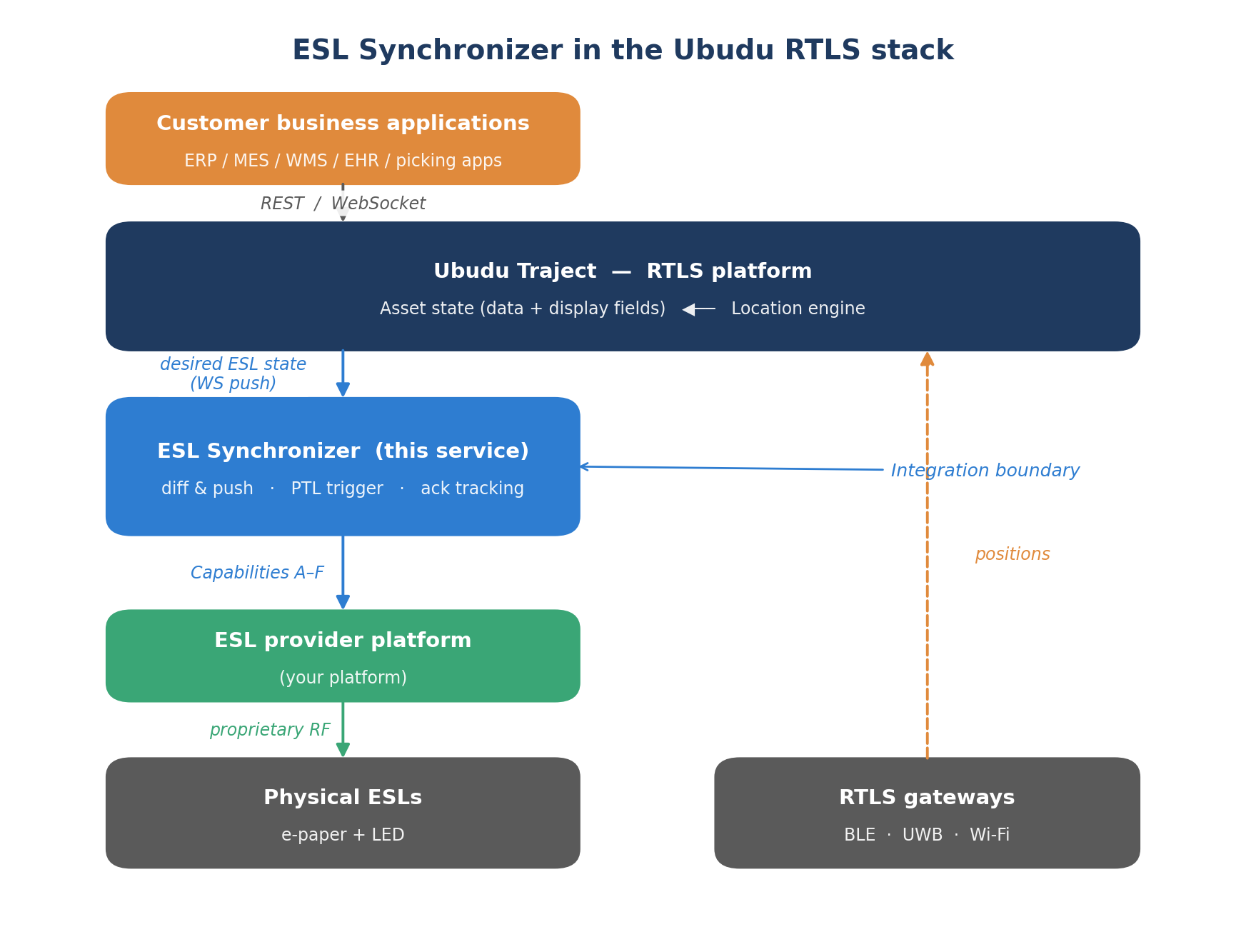
When a condition fires, the ESL Synchronizer sends the action with an externalEventId, waits for acknowledgement, and logs the full lifecycle to Elasticsearch with retry and timeout handling — a true bidirectional loop.

Pick-to-Light
Drive a tag's LED RED or GREEN for a chosen duration (1–3,600 seconds) to locate an asset instantly.
ESL Displays
Update an electronic shelf label's content — price, instruction or status — with acknowledgement.
Correlated & Audited
Every action is correlated by externalEventId and logged, e.g. Update SUCCESS — transmission 354 ms, elapsed 13.2 s.
BLE 5.4 PAwR powers this bidirectional loop natively across our UWB/BLE product line — our multi-technology tags use BLE 5.4 PAwR to drive ESL displays, pick-to-light and locks, each action acknowledged and audited.
Build Your Own Agent
Build on the same foundation and harness our own agents run on. Reach the spatial primitives and query API through the governed tools, compose them with the natural-language Rule Generator and the SDK — on the same governed data, with the model and deployment of your choice.
1 · Reason over tools
Connect any MCP client and let the agent call the 44 governed tools to read verified location, zones and navigation.
2 · Generate rules
Turn plain language into validated, test-passed rules — like the battery-alert JSON above — and publish them.
3 · Act & audit
Trigger pick-to-light, ESL updates or locks from the located tag, each acknowledged and written to the audit trail.
Run It On-Prem — Same Harness, Local Model
The harness, the MCP tools and your agent code stay identical from cloud to air-gapped. Swap the model to an open-weight one on any OpenAI-compatible local endpoint, and data stays on your infrastructure.
import asyncio
from agent_sdk import query, AgentOptions

async def main():
    async for message in query(
        prompt="Analyze quality inspection report",
        options=AgentOptions(
            allowed_tools=["Read", "Bash", "Grep"],
            # point at any OpenAI-compatible local endpoint
            base_url="http://localhost:11434/v1",
        ),
    ):
        print(message)

asyncio.run(main())
The model sees only the question, the tool descriptions and the tool results — your database stays on your infrastructure. Deploy across 6 options, cloud to on-prem/air-gapped. Aligned with GDPR and the EU AI Act.
Harness Security & Audit
- Three enforcement layers of tool governance — what each agent may call is filtered at the SDK level, at the MCP interface, and again at the prompt level, so the model can only reach pre-approved tools.
- Per-user scoping — tools call back as the user, with their own API key and namespace, so every result is scoped to what that user is allowed to see.
- Human-in-the-loop confirmation — mutations are never applied directly; the agent proposes a change and waits for the operator's explicit Apply / Skip decision.
- Prompt-injection guards — untrusted content (logs, config, traces) is isolated before it ever reaches the model.
- Cost & turn ceilings — per-turn cost and max-turn limits bound every conversation, with a loop guard on repeated failures.
- TLS in transit for all HTTP traffic; credentials passed via request headers.
- Governed exposure — per-property LLM-Enabled toggles decide which fields a model can ever see.
- Append-only audit trail — every physical action is correlated by ID and logged with its transmission time.
Roadmap for Builders
We set out this AI roadmap at VivaTech in 2025. Here's what shipped — and what's next.
Scalable Query API & Governed Tool Interface
The scalable rtls-api query surface (130 REST endpoints, 20 modules) and a governed MCP interface (44 tools across three agents) over live RTLS, plus the typed ubudu-rtls-sdk (TS/JS) with 8 resource classes and a 14+ operator filter DSL.
Natural-Language Rule Generation & Write-Path
Plain language to validated, test-passed rules — and a closed-loop write-path: ESL e-paper, pick-to-light LEDs and locks, acknowledged and audited.
BLE 5.4 PAwR Across the UWB/BLE Product Line
BLE 5.4 PAwR powers the bidirectional, actionable write-path natively: our multi-technology UWB/BLE tags use PAwR to drive ESL displays, pick-to-light LEDs and locks, each action acknowledged and audited.
Knowledge Base Agent
Conversational access to 10+ years of Ubudu knowledge base and platform documentation — ask how to do something, or why the system behaves a certain way, and get grounded, cited answers from a decade of deployment know-how.
ILS Engine Configurator
Conversational tuning of the positioning engine itself: the agent guides 100+ parameters across our algorithms and filters — map-matching, particle filtering, fusion — in the Ubudu ILS engine, a C++ multi-hybrid RF RTLS solver, so accurate location no longer depends on scarce RF expertise.
Visual Agent Builder
A visual, drag-and-drop builder for composing custom agents over the same governed tools — assemble your own perceive–reason–act workflows without code.
Developer FAQ
ubudu-rtls-sdk is TypeScript / JavaScript only. For other stacks, call the REST API directly or connect through MCP, which works with any language.