
Most RTLS platforms see the floor. Ubudu acts on it.
AI Agents for RTLS Operations
Describe what you want in plain language. The agent generates the rule, tests it, and deploys it against live location — then the floor acts.
For: operations and lean teams, IT directors, integrators, and AI specialists who want agentic operations over verified location, not another dashboard to watch.
Data-grounded: the model orchestrates, but every number it shows is read from live RTLS through governed tools, with field names validated against your live data model.
One Proven Harness, Runs on Any LLM
These agents are the top of a deep spatial stack — not a chatbot. They share one scalable, secured, model-agnostic agentic harness that sits on a foundation of spatial primitives and scalable real-time query tools. The harness handles governance, grounding and audit; the agents perceive, reason and act on your floor.
Built on a foundation
The agents stand on a spatial core — 6.6M distance operations and 4M point-in-polygon operations per second — and a scalable API that ingests 100,000+ positions per second with real-time streaming and multi-instance scaling.
Scalable & secured
Isolated per-user sessions, JWT and API-key auth with namespace scoping, governed tool access (the model sees only what LLM-enabled toggles allow), human-in-the-loop confirmation, and a full audit trail on every action.
Model-agnostic
The same harness runs on a frontier cloud model or an open-weight model on your own hardware. Swapping the brain is a configuration change, never a rebuild — with 6 deployment options from cloud to air-gapped on-prem.
The harness reaches your floor through a governed Model Context Protocol (MCP) interface — 44 governed tools (13 dashboard, 16 script, 15 RTLS discovery) are how the four agents read live location and act on it, not the product itself. The moat is the depth underneath: spatial primitives, scale, and a secured model-agnostic harness, in production since 2025.
RTLS AI Assistant
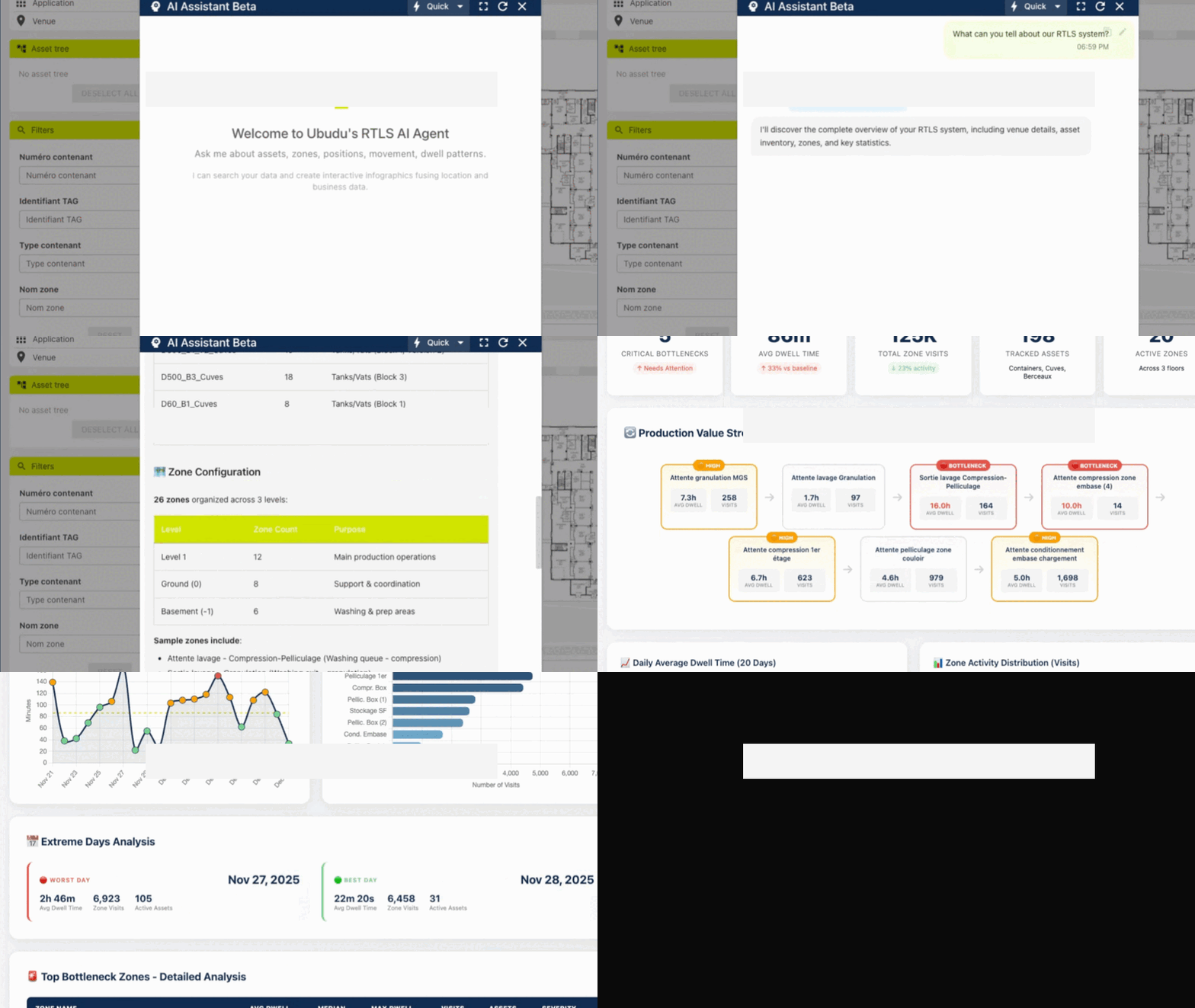
Conversational AI on the same harness, grounded in live location through governed tools. Ask questions in plain language; get answers with interactive maps, dashboards and clickable actions — system discovery, route optimization, value stream mapping and value-at-stake scenarios, all read from live RTLS.

Three Thinking Modes, Auto-Routed
The assistant routes each query to a processing tier based on complexity — everyday lookups stay in the Quick or Standard tier, while heavier analysis escalates to Deep. These are routing tiers, not hard service-level guarantees.
Lookups
Asset lookups, system discovery, basic filters.
Fastest tierAnalysis
Zone occupancy, dwell patterns, trend analysis.
Balanced tierComplex Reasoning
Value stream mapping, value-at-stake scenarios, route optimization.
Deep-reasoning tierWhat You Can Do
System Discovery
"What can you tell me about our RTLS system?"
→ Facility profile, asset inventory, zone mappingRoute Optimization
"Show me the route to pick up all D60 containers."
→ Interactive map with an optimized multi-stop routeValue Stream Mapping
"Do a complete VSM highlighting bottlenecks over 20 days."
→ A dashboard with flow analysis, trends and worst daysValue-at-Stake
"If each container is worth €20k, what's stuck in the bottleneck?"
→ Scenario analysis grounded in live position dataUI Deep Links
The assistant generates clickable links that control the RTLS interface.
→ View on map, activate pick-to-light, navigateIterative Refinement
"Add a visualization of containers per day."
→ Updates the existing dashboard, keeps contextThe Governed Interface to the Foundation
The harness reaches the spatial foundation through a governed Model Context Protocol interface — an open standard under the Linux Foundation. 44 governed tools (13 dashboard, 16 script, 15 RTLS discovery) expose live location and actions; the categories below are the RTLS discovery tools the AI Assistant uses to read your floor. The model only reads what these tools return, never raw guesses.
Discovery
rtls_discover_system
rtls_get_data_model
rtls_get_field_info
Venue
rtls_get_venue_geometries
rtls_find_zone_at_point
rtls_get_zone_presence
Asset
rtls_list_assets
rtls_search_assets
rtls_get_asset
Zone
rtls_find_zones_in_radius
rtls_get_zone_history
rtls_calculate_zone_distances
Navigation
rtls_navigate_shortest
rtls_navigate_accessible
rtls_optimize_multi_stop
Real-time
rtls_get_current_positions
rtls_get_position_history
rtls_find_nearest_assets_realtime
Spatial
rtls_analyze_custom_zones
rtls_find_pois_in_radius
rtls_analyze
rtls_analyze returns a zone-flow graph, a dwell heatmap and flagged anomalies — the raw material the assistant turns into a VSM. The spatial core runs 6.6M distance operations and 4M point-in-polygon operations per second.
Model-Agnostic by Design
The same agent harness runs over a frontier cloud model or an open-weight model on your own hardware — swapping the model is a configuration change, not a rebuild.
Cloud / frontier
- Claude
- GPT-5
- Gemini
- Any OpenAI-compatible endpoint
Open-weight / on-prem
- Mistral
- Llama
- Qwen, DeepSeek
- Kimi, MiniMax
Connect any MCP client
- Claude Desktop, Claude Code
- Cursor, Windsurf
- n8n, LangChain, LangGraph
- CrewAI, AutoGen, LlamaIndex
Run an open-weight model on-premise for EU data sovereignty — the model sees only your question, the tool descriptions and the tool results; your location database stays on your infrastructure.
Speak → Rule Agent
Describe a monitoring rule in plain language. The agent writes it against our natural-language rule engine across 24 RTLS facts and 5 action types, generates test cases, refines and re-tests up to 5 times, and you publish it — no JSON by hand.

How It Works
Describe
Write your rule in plain language. No syntax to learn.
"Alert when a tag's battery drops below 20%"
Generate
The agent converts it to a validated json-rules-engine rule automatically.

Test
The agent generates test cases and runs them, then automatically refines and re-tests — up to 5 refine-and-retest passes — until the rule is correct.

Deploy
One click to activate. The rule runs in production against live location immediately.

The Rule It Actually Generates
This is the real output for "alert when battery < 20%" — a validated json-rules-engine rule, ready to run, with no JSON written by hand.
{
  "conditions": { "all": [
    { "fact": "battery_percent", "operator": "lessThan", "value": 20 }
  ]},
  "event": { "type": "message", "params": {
    "title": "Low Battery Alert",
    "text": "Asset battery is below 20%",
    "style": "warning", "duration": 10,
    "coalescence": 3600, "coalescence_group": "battery_alerts"
  }}
}
The generator validates fields against your live data model and de-duplicates repeat alerts with a coalescence group — so one low battery doesn't page you every second.
Example Prompts by Industry
- "Alert if WIP exceeds 50 units in assembly zone"
- "Notify when a calibrated tool leaves the clean room"
- "Email the supervisor if dwell exceeds 2 hours in QC"
- "Alert when a forklift is idle for more than 30 minutes"
- "Notify if a container enters a restricted zone"
- "Send an alert when dock occupancy exceeds 80%"
- "Alert if a wheelchair leaves the patient floor"
- "Notify when an IV pump battery drops below 20%"
- "Email if a defibrillator is not in the cardiac unit"
Dynamic Fact Support
The Rule Agent automatically discovers and works with the fields from your custom data model. Your taxonomy, your fields — available for rule creation in plain language.
Works With Your Taxonomy
Custom asset types, user-defined properties and extended metadata are discovered and made available in natural-language rules. A per-property LLM-Enabled toggle controls exactly which fields the agent can see.
Asset Facts Examples
asset.idasset.typeasset.nameasset.batteryasset.lastSeenasset.[your-custom-field]
Location Facts Examples
asset.location.zoneasset.location.floorasset.location.buildingasset.location.xasset.location.y
Zone Facts Examples
zone.idzone.namezone.typezone.capacityzone.currentOccupancyzone.[your-custom-field]
Time Facts Examples
time.hourtime.dayOfWeektime.isBusinessHourstime.timestamp
These are common examples. The Rule Agent works across 24 RTLS facts and 5 action types, with per-type operator sets, and supports the fields defined in your RTLS data model.
From a Rule to a Light on the Tag
A rule isn't the end of the story. When the condition fires, the same located tag writes back into the physical world.
1 · Describe
"Alert when a tag's battery drops below 20% in the assembly zone."
2 · Generate & test
The agent writes the rule and runs generated test cases. You publish it.
3 · Monitor
Live position from BLE / UWB / GNSS is matched against the rule in real time.
4 · Act
The condition fires: the tag's pick-to-light LED turns red — logged with its transmission time.
Every physical action carries an externalEventId, waits for acknowledgement, and is written to an audit trail (real log line: Update SUCCESS — transmission 354 ms, elapsed 13.2 s). BLE 5.4 PAwR powers this bidirectional loop across our UWB/BLE product line — our multi-technology tags drive ESL displays, pick-to-light LEDs and locks natively.
Describe → Dashboard Copilot
Turn a plain-language request into ready-to-use charts and dashboards you confirm before they apply. Ask for a view, the copilot proposes it against live location, and nothing changes until you approve — 13 validation and proposal tools across positions, zone visits and alerts, tested and validated (249 tests).
Plain Language In, Confirmed Dashboards Out
The Dashboard Copilot is the analytics agent on the same harness — it reads live position, zone-visit and alert data through governed tools, proposes a visualization, and waits for your confirmation before applying it.
Plain-language authoring
Describe the chart you want — throughput by day, dwell by zone, a value stream map — and the copilot composes it. No query language, no dashboard config by hand.
Live preview
See the proposed chart rendered against your real data before it lands, so you can tell at a glance whether it answers your question.
Confirm before apply
Nothing is written until you approve. The copilot emits a proposal; you accept it, and only then does it become part of your dashboard.
Dynamic variables
Charts adapt to dynamic variables — time windows, zones, asset types — so one proposed view answers a family of questions.
Source-aware validation
Every proposal is validated across three data sources — positions, zone visits and alerts — so the chart is grounded in fields that actually exist.
Iterative refinement
"Add containers per day." The copilot updates the existing dashboard and keeps context, so you build a view conversationally.
The Dashboard Copilot is one of the four agents on the shared harness — the analytics pairing alongside the Rule Agent (rule engine) and the Script Agent (real-time script engine).

Plain-Language Request to Confirmed Dashboard
Ask in plain language; the Dashboard Copilot proposes interactive visualizations you confirm before they apply — 13 validation and proposal tools, validated across positions, zone visits and alerts. Above, it proposes a chart with a live preview; below are dashboards it has produced.


Describe → Script Agent
A specialized coding agent that writes and tests safe scripts for real-time RTLS event processing — describe what you want, the agent proposes a script, tests it against fixtures, and you deploy it. The same describe → propose → test → deploy pattern as the Rule Agent, but for live event-processing logic.

1 · Describe
"When a pallet leaves staging without a scan, flag it." You say it in plain language.
2 · Propose
The agent drafts a real-time event script and shows you a diff to review.
3 · Test
It runs the script against fixtures so you can see it behave before anything ships.
4 · Deploy
You confirm, then it goes live in the sandboxed engine — processing events in real time.
A Safe, Sandboxed Engine With an Agent Front-End
Underneath the Script Agent is a safe, sandboxed scripting engine for processing RTLS events in real time — with a specialized coding agent that writes and tests the scripts for you. Every change is validated, fixture-tested, and only goes live after you approve it.
Safe by construction
Scripts run in an isolated sandbox with no access to the host — no filesystem, shell or network. Every change is validated before you ever see it, and the running script keeps going untouched until you approve the new version.
Real-time event processing
Deployed scripts run inside the live dispatcher, reacting to events such as a tag entering or leaving a zone as they happen — with persistent per-asset state for logic that remembers what came before.
Agent-authored & tested
The coding agent drafts the script, validates it, and runs it against fixtures so you can see it behave before it ships. You confirm with a diff, then deploy — describe, propose, test, deploy.
The Script Agent is the third agent–engine pairing on the same harness: Rule Agent with the rule engine, Script Agent with the real-time script engine, and the Dashboard Copilot with analytics — each a real engine with a plain-language front-end.
Build Your Own Agent
The same governed infrastructure that powers the four agents is open for your own. Connect any MCP-compatible client, build on the rich API and typed SDK, or script with the CLI to compose your own perceive → reason → act agents — on the same secured, model-agnostic foundation.
MCP servers
Connect any MCP-compatible client to the governed Model Context Protocol interface and let your own agent perceive and act over live location — the same open standard the four agents use.
Rich API + SDK
Build directly on a rich REST API and a typed TypeScript/JavaScript SDK — query, navigate and analyze live and historical location to compose custom reasoning and actions.
CLI
Script and automate from the command line — wire the same governed tools into your own pipelines and agent workflows without leaving the terminal.
Agent Roadmap
We set out this AI roadmap at VivaTech in 2025. Here's what shipped since — and what's next.
Speak → Rule Agent
Plain language to a validated, tested json-rules-engine rule — generated, test-passed and deployed against live location.
- Natural-language rule generation
- Auto-generated test cases
- Works with your custom data model
- One-click deploy to production
Closed-Loop Physical Actions
Agents drive ESL displays, pick-to-light LEDs and locks from the located tag — with externalEventId correlation, acknowledgement and an audit trail.
- ESL e-paper label updates
- Pick-to-light LED guidance (1–3600s)
- Electronic lock & access control
- Acknowledged, logged with transmission time
Describe → Script Agent
A specialized coding agent that writes and tests safe scripts for real-time RTLS event processing — describe, propose, test against fixtures, deploy.
- Safe, sandboxed scripting engine
- Real-time event processing with per-asset state
- Agent-authored and fixture-tested
- Goes live only after you approve
BLE 5.4 PAwR Bidirectional Tags
BLE 5.4 PAwR powers bidirectional, actionable tags across our UWB/BLE product line — our multi-technology tags drive ESL displays, pick-to-light and locks natively.
- BLE 5.4 PAwR bidirectional write-path
- ESL, pick-to-light & lock actions on-tag
- Multi-technology UWB/BLE/GNSS tags
- Acknowledged & audited closed-loop
Knowledge Base Agent
Conversational access to 10+ years of Ubudu knowledge base and platform documentation — ask how to do something, or why the system behaves a certain way, and get grounded answers from a decade of deployment know-how.
- 10+ years of deployment know-how
- Full platform documentation
- Grounded, cited answers
- For clients & partners
ILS Engine Configurator
Expert-grade tuning of your hybrid BLE/UWB deployment, made conversational. The agent guides 100+ parameters across our positioning algorithms and filters — map-matching, particle filtering, fusion — in the Ubudu ILS engine.
- 100+ engine parameters, guided
- Map-matching & particle filtering
- Hybrid BLE / UWB tuning
- Built on our C++ multi-hybrid RF solver
Agent Builder
A drag-and-drop visual builder for composing custom agents — so teams can assemble their own perceive–reason–act workflows without code.
- Visual drag-and-drop workflow editor
- Compose custom agents
- Pre-built action blocks
- On the roadmap
See the Agents on Real RTLS Data
Book a 30-minute online demo.
We'll generate a rule live, watch it act on a tag, and discuss your use case.